
PRODUCT
KnowSaaS AI Workspace
A desktop AI client for merchants in every industry: ask for data or reports in plain language, or perform write actions such as publishing, inventory changes and coupon issuing with item-by-item confirmation and an audit trail. The content hub creates posters and short videos, the media assistant writes from trending topics to Xiaohongshu and WeChat articles, and the AI browser operates Ctrip, Meituan, Fliggy and Douyin Life directly. Scheduled tasks and existing system integrations live in the same window.
Switching between a dozen back offices every day
The workspace folds data queries, product edits, reports and content into one chat window
Too many back offices
Douyin, Meituan, Ctrip, mini programs, redemption systems… you switch between a dozen back offices every day.
Scattered data
Revenue, orders and inventory live in separate systems; comparing channels means manually building spreadsheets.
Fragmented operations
Listing, delisting, inventory changes, redemptions and coupon issuance eat up time in repetitive clicks.
Core capabilities
More than Q&A — it can really query, change and deliver
Ask for data, get a file
Query revenue, orders, redemptions, inventory and channel comparisons in one sentence, then export Excel, PPT, Word or PDF that matches the back office.
Query and change
List or delist products, open or close calendar sales, adjust inventory, reverse redemptions, issue coupons, create distributors and set up suppliers — every write is confirmed one by one.
One window for every back office
The KnowSaaS back office is embedded in the client with your session carried over; Ctrip, Meituan Tickets, Fliggy and Douyin Life are operated in the same window.
One content production chain
Graphic posters, template videos and smart editing; the media app writes Xiaohongshu and WeChat articles with chat on the left and live preview on the right.
Operations automation
Morning briefs, inspections, reconciliation and weekly reports run on your operating rhythm; results land in the chat or push to WeCom, with every write confirmed.
Data stays on your machine
Sessions, instructions and outputs are stored locally; writes require human confirmation by default, and the approval trail is fully auditable.
Workspace at a glance
- Conversation is operation: streaming answers, visible execution and results, and you can interject while it runs
- Built-in shortcuts cover revenue, orders, redemptions, inventory, suppliers, distribution, coupons and reports — or write your own
- Apps live in one sidebar: Content Plaza, Media, Store Design, Product Editor and Request Collection
- Sessions are grouped by workspace with search, pin, rename and bulk organization
- Generated Excel, PPT, Word, PDF and video files all land in the download list and can be located directly
- Connect WeCom or personal WeChat by QR code and handle messages in the chat

From a single poster to a finished video
Content Plaza handles visuals and video, Media handles topics and drafts, and outputs land in the download list
Graphic posters
Local template layout with 120 styles, 17 layouts and 3 sizes, up to 3 images placed freely; one topic fills in the title and selling points, with live preview and 2x PNG export.
Template videos and smart editing
24 templates cover room types, tickets, packages, products, shows and travelogues, output in 9:16 portrait; give a topic and AI writes the script, then auto voiceover, subtitles and music compose a 15/30/60-second clip.
Media writing
Find topics in the marketing calendar and trending lists on Weibo, Douyin, Baidu, Toutiao and Zhihu, then generate Xiaohongshu and WeChat versions at once; WeChat includes 10 layout templates and checks prohibited and superlative wording as you write.
Video features download a ~100MB component on first use; template videos also require Chrome or Edge installed locally.
Standalone apps in the same sidebar
Store Design
Redesign the storefront through chat with 8 themes and 5 styles and a live H5 preview on the right; after confirmation you still publish the preview in the back office.
Product Editor
Edit product details, user agreements and About Us through chat with live preview, save to the back office and keep a local version for rollback.
Request Collection
Talk your idea through with AI and turn it into a Requirements Specification, archived locally first.
AI Browser: operate OTA platforms by chat
No more repeated logins across Ctrip, Meituan, Fliggy and Douyin Life
Preinstalled platforms
Review queries currently support Douyin Life first; other platforms follow on demand, and the platform list updates with client versions.
- Ctrip, Meituan Tickets, Fliggy and Douyin Life are preinstalled in the client, each with its own session that persists after one login
- AI can read pages, click buttons, fill forms, paginate and take screenshots, with every step visible
- Page requests are monitored so OTA back-office data is captured and organized into structured results
- Writes such as refunds, deletions and submissions pause for human confirmation
- No account custody: multi-platform accounts are not stored, and we never log in on your behalf in bulk
Integrates with the systems you already use
No replacement, no migration: custom integration on top of your existing systems, operated from the AI workspace
- Keep your existing systems: ticketing, POS, membership, finance and in-house ERP stay in use with no data migration.
- Custom integration by API: tailored to your system's APIs, field definitions and permission model, with API calls, data sync and page-level operation adapters.
- One conversational entry point: query data and perform operations in the workspace, while existing pages and processes keep working.
- Permissions and audit carry over: account permissions follow the original system, and every write is confirmed and logged for traceability.
Existing customer systems
Douyin ¥128,400 · Meituan ¥96,800 · Mini program ¥42,600
Generated channel-revenue.xlsx
Pending: adjust calendar inventory ×3
Existing systems keep working; the workspace is just a new entry point
- 01
System assessment
Map the existing systems, API capabilities and data definitions, and confirm what can be integrated.
- 02
Custom integration
Adapt to APIs and fields, and fill in missing query and write capabilities.
- 03
Joint validation
Test read and write operations one by one and verify results against the original systems.
- 04
Go live
Keep the original systems and use the workspace for unified queries and operations without interrupting existing processes.
Real-world scenarios
Starting with the daily morning business review
Daily stand-up
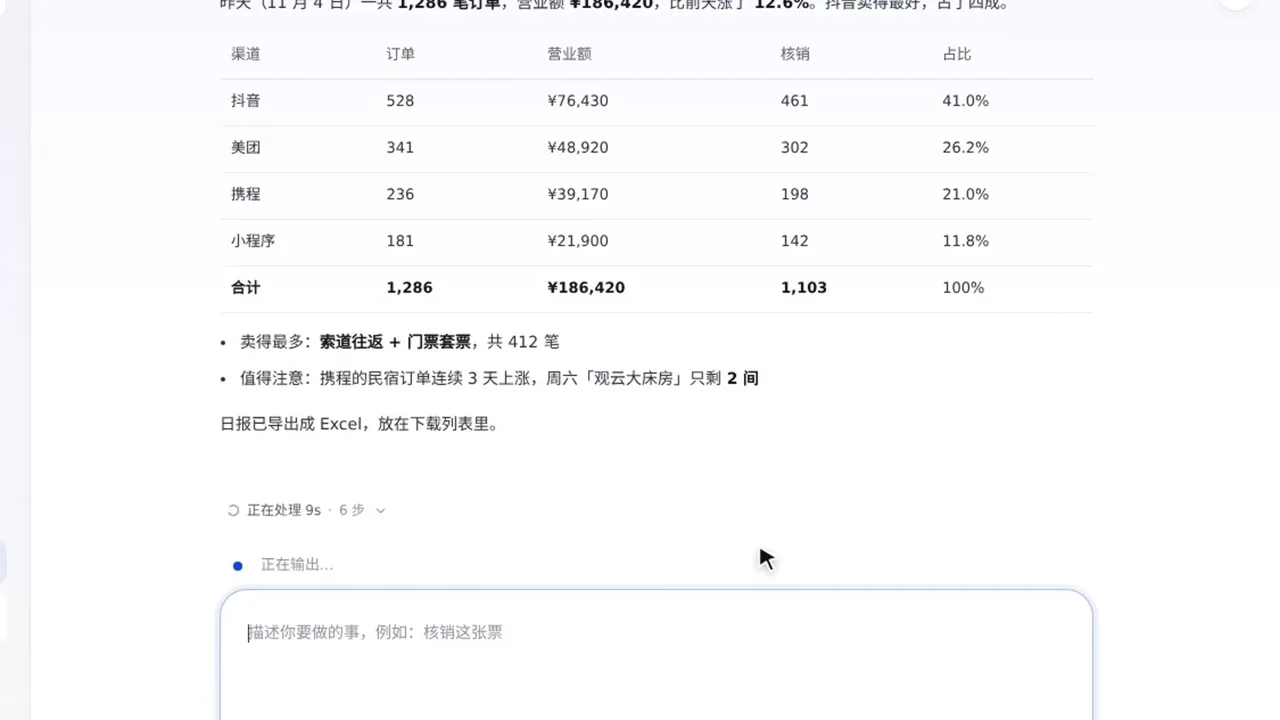
One sentence to explain yesterday's business
- "Show yesterday's revenue, compared by channel"
- Automatically consolidates Douyin, Meituan, Ctrip and mini program data and highlights the best-selling product
- Flags room-status and inventory alerts, and exports the daily report as Excel to the download list
- Schedule it to run automatically at 9:00 every morning
Media
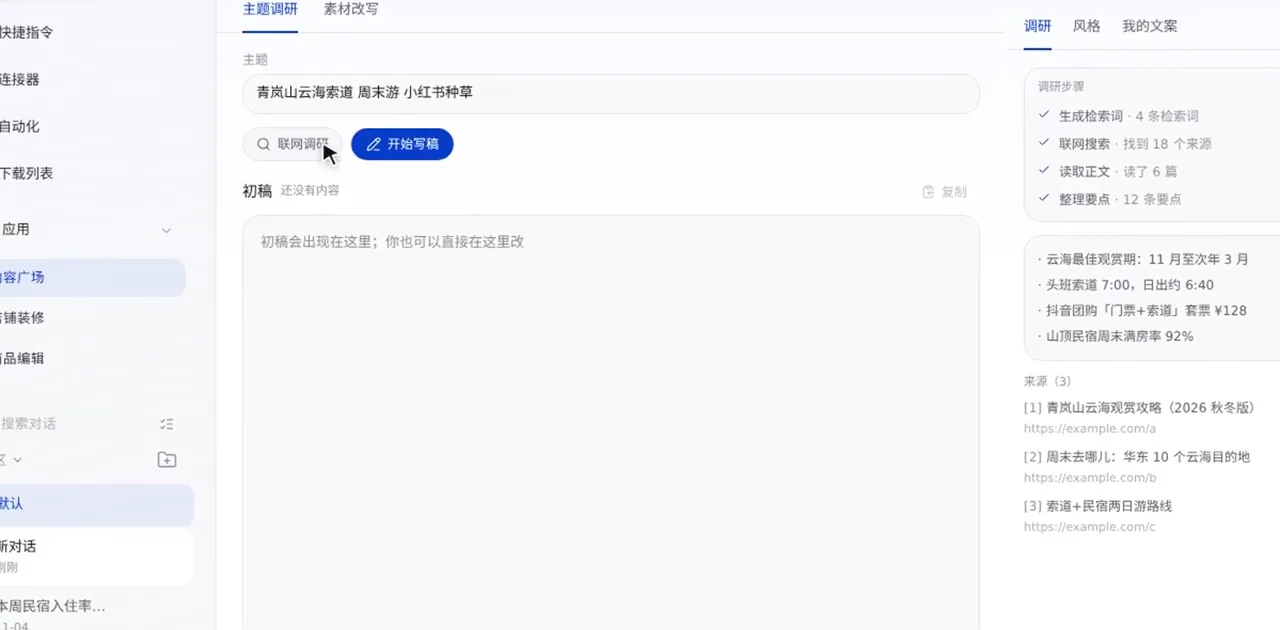
From topic to a publish-ready article
- Pick a topic from the marketing calendar or trending lists on Weibo, Douyin, Baidu, Toutiao and Zhihu
- Generate Xiaohongshu and WeChat versions at once, sharing the same facts and web research sources
- 10 WeChat layout templates; copy the body with inline styles and paste it straight into the editor
- Add the link after publishing and the rest of the batch is marked as published
Front desk redemption
Guests give a phone number or name, the voucher is found and redeemed; a mistake can be reversed immediately.
Pre-holiday operations
Open or close sales by date, adjust calendar inventory and delist by product name, executed after item-by-item approval.
Supplier onboarding
Choose a supplier and channel, fill in parameters, run a connectivity test, then read back and verify the configuration.
Operations automation: let the system execute operational judgment every day
See the business, judge anomalies, take action and archive reviews — a four-step loop that runs automatically, while people set standards and handle exceptions
Operations automation is not just another scheduled task — it hands the operating loop of "set goals, read data, adjust actions, review" to the system. People stop circling back offices and start circling goals.
What the system does
Run repetitive operations as a daily routine
Cross-system data retrieval, unified definitions, threshold inspections, repetitive actions and result archiving, without anyone watching the back office.
What people do
Set standards and judge exceptions
Set goals and rules, handle exceptions, approve sensitive actions and decide the next strategy — the call is still yours.
See: one version of the facts every day
The morning brief brings revenue, orders, redemptions, refunds and channel comparisons together under one definition and delivers them to the chat or WeCom on time.
Judge: quiet when normal, clear when not
Inspect refunds, redemptions, inventory, prices and stockouts against thresholds, alert only on anomalies and list what needs handling.
Act: from conclusion to the back office
Listing, calendar, inventory and coupons follow the rules; sensitive actions such as refunds, deletions and submissions wait for item-by-item confirmation.
Review: every run leaves evidence
Status, trigger, results and approval records are all viewable, so each run is accountable and rules keep improving from there.
Scheduling follows your operating rhythm
Runs in the local time zone, accurate to the minute
Morning briefs, inspections, weekly reports and month-end reviews each have their own rhythm. "Interval" can confine the window, e.g. an inspection every 60 minutes only between 09:00 and 21:00; "Daily" supports multiple times so the morning brief and evening review can run separately.
Send to
New session, pinned session or a specific project
Push to
WeCom (optional)
Content schedule
Write, check and save drafts on schedule every day
Reusable operations SOPs
8 templates cover business analysis, anomaly control and growth actions; the definitions are already right — apply them and adapt to your business.
Daily operations brief
Revenue, orders, redemptions, refunds and day-over-day comparison, ready before opening
Daily 09:00
Operations anomaly inspection
Refunds, redemptions, inventory and unpaid anomalies; silent when normal, alert when not
Every 60 min · 09:00–21:00
Inventory and price inspection
Low inventory, inverted prices and calendar stockouts, with a to-do list
Daily 10:00
Distributor daily report
Distribution GMV, top rankings, zero-order and commission anomalies
Daily 09:30
Channel reconciliation inspection
Refund rates, traffic drops and share anomalies across channels and OTAs
Daily 10:30
Operations weekly report
Last week's revenue, products, users and distribution, with week-over-week and this week's focus points
Mon 09:00
Today's topic recommendations
Trending lists plus the marketing calendar, suggesting 3–5 writable topics
Daily 09:00
Review monitoring
Low-score review list and reply points; nothing is posted on your behalf
Daily 10:00
Delegate with confidence because the boundaries are clear
Authorize, stop and trace — that is what makes automation trustworthy.
Three permission levels
Default permissions confirm each action; auto review lets AI decide first and leave a trail, and it still asks when unsure; full access is reserved for trusted scenarios.
The model cannot approve itself
Write confirmations are handled by people; the model cannot approve on its own behalf, and every approval is written to a local audit log.
Capped in messaging channels
Actions started in WeCom or personal WeChat stop at auto review and never inherit full access from the desktop client.
Nothing runs when the app is closed
Automation is a local task that runs only while the client is open; missed runs are not backfilled, avoiding duplicate operations.
No concurrent runs
A new run does not stack on an unfinished one; the same moment counts once and never triggers twice.
Isolated by account
Automation is isolated by signed-in account, invisible after switching and never runs another account's tasks.
From one person's experience to a team standard
The goal of operations automation is not saving a few hours, but making operating standards repeatable
Experienced operators' judgment becomes rules and templates that new stores and projects can apply directly; the team stops watching separate back offices and shares one set of definitions, one rhythm and one review method. People spend time on growth, while the system handles the repetitive work.
See how it works
Get to know KnowSaaS AI Workspace in 90 seconds
Platform and delivery
Desktop client, ready to use after download
Windows client
Supports Windows x64; install and start using.
macOS client
Supports Apple Silicon (M-series chips).
Online updates
New versions download in the background and finish after a restart.
Account as pass
Sign in with a KnowSaaS account; permissions and tenants are decided by the server.
